Integracija web servisa NBS
Podešavanje Servisa
Pre nego što aktivirate ovu funkcionalnost, potrebno je ispuniti sledeće uslove:
-
Preduzeće mora biti registrovano u web sistemu Narodne banke Srbije.
-
Digitalni sertifikat mora biti instaliran.
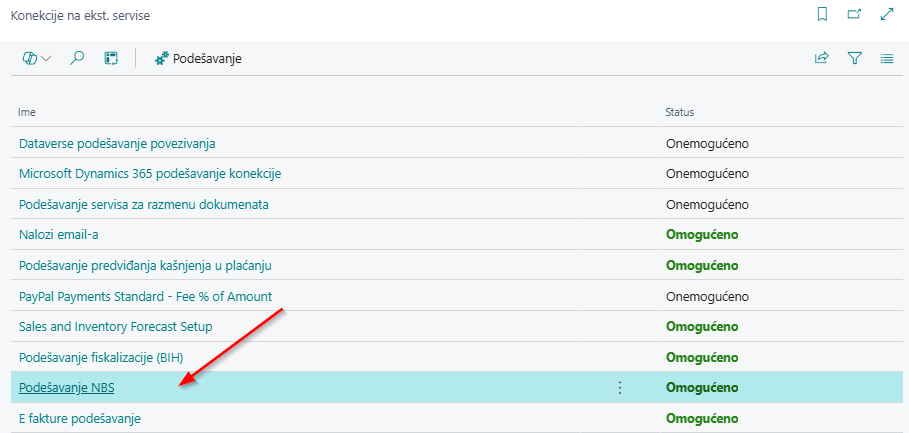
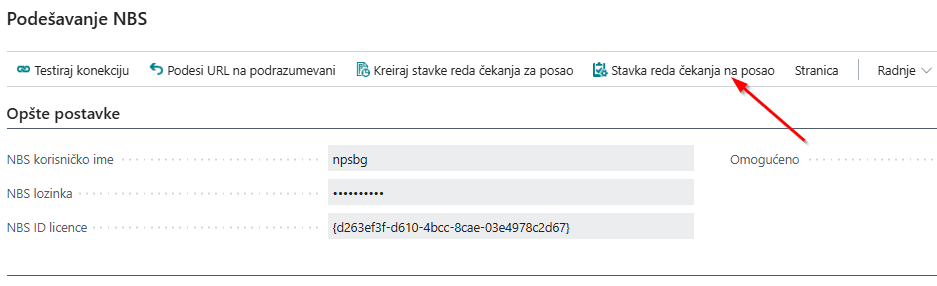
Povezivanje sa web servisima NBS možete pristupiti preko pretrage u Business Centralu, u pretragu unesite Konekcije na ekst. servise, pristupite stranici i odaberite Podešavanje NBS.
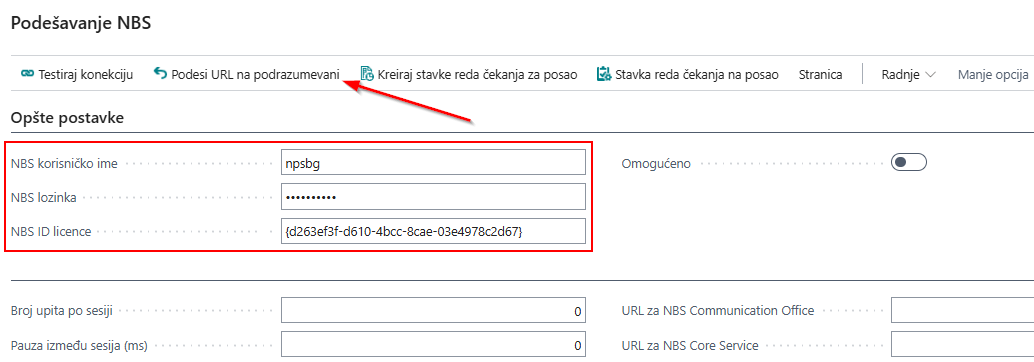
Na tabu Opste postavke na stranici Podešavanje NBS, obavezno je uneti:
- NBS korisničko ime - dobijeno od NBS
- NBS lozinku -dobijeno od NBS
- NBS ID licence - dobijeno od NBS
Nakon unosa podataka u polja NBS korisničko ime, NBS lozinku, NBS ID licence pokrenite akcija Podesi URL na podrazumevane na stranici Podešavanje NBS, koja omogućava preuzimanje svih neophodnih URL-ova za dalji rad sa web servisom NBS.
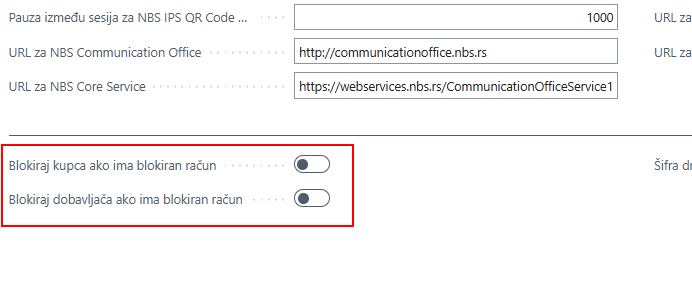
Na stranici Podešavanje NBS, opcije Blokiraj kupca ako je banka blokirana i/ili Blokiraj dobavljača ako je banka blokirana omogućavaju da kupac ili dobavljač koji je blokiran od strane Narodne banke Srbije bude automatski blokiran i u Business Central-u. Na taj način imate pravovremenu informaciju o pokrenutoj prinudnoj naplati (blokadi računa) i dodatnu kontrolu u daljem poslovanju.
Napomena: Funkcije blokiranja mogu se prilagoditi ukoliko želite da nastavite saradnju sa blokiranim kupcem ili dobavljačem. To se podešava direktno na kartici kupca/dobavljača, u delu Opšte. Opcija Blokirano na katici kupca i dobavljača sadrži padajući meni u kojem možete izabrati šta se blokira (isporuka, faktura, sve)
Omogući servis NBS
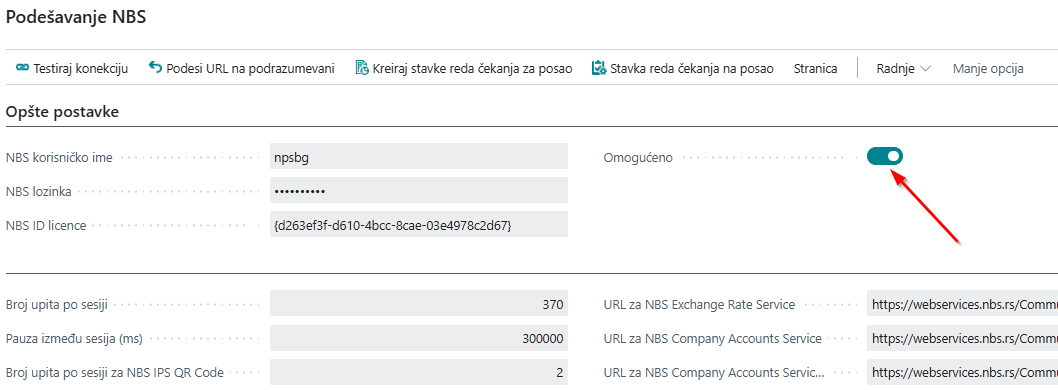
Da bi servis sa Narodnom bankom Srbije bio omogućen, nakon preuzimanja URL-ova i unosa korisničkog imena, lozinke i ID licence, potrebno je označiti (čekirati) opciju Omogućeno – na stranici Podešavanje NBS. Nakon toga možete nastaviti sa sledećim koracima za preuzimanje podataka sa Narodne banke Srbije.
Način primene funkcionalnosti NBS
Sledeći korak je pokretanje akcija obuhvaćenih NBS funkcionalnostima.
Na stranici Podešavanje NBS, u okviru akcije Radnje, a zatim izborom akcije Preuzmi podatke sa NBS, dobićete spisak dostupnih akcija za preuzimanje, koji uključuje:
-
Lokalne banke
-
Valute
-
Grupe delatnosti
-
Regioni
-
Države
-
Podaci o poslovnom partneru
-
Bankovni računi kupaca i dobavljača
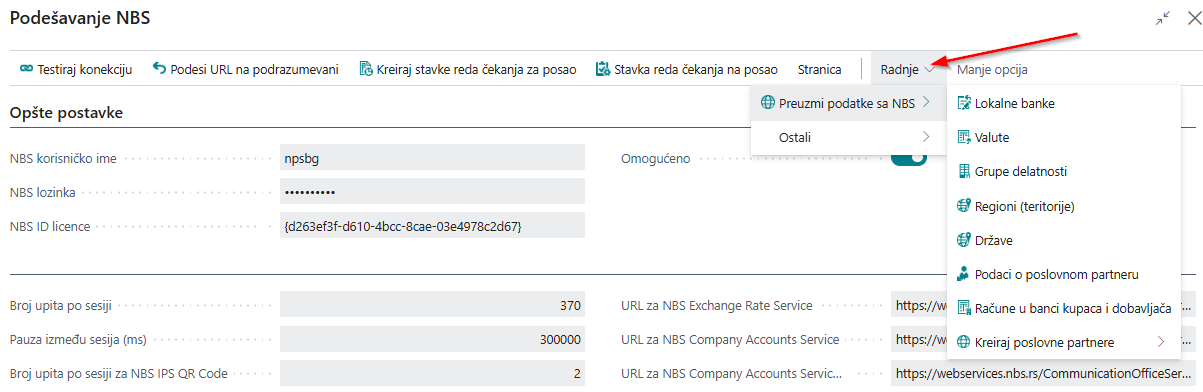
Akcija Lokalne banke
Akcija Lokalne banke uvozi sve informacije o državnim registrovanim bankama – naziv, adresu, kontakt podatke i web stranicu, čime se obezbeđuje baza svih lokalnih banaka.
Šifarnik lokalnih banaka je neophodan za kreiranje valuta lokalnih banaka, odnosno prilikom kreiranja kursa sa lokalne banke.
Redovno ažuriranje šifarnika lokalnih banaka i tekućih računa kupaca i dobavljača je preduslov za funkcionisanje funkcionalnosti kao što su platni promet, predlog plaćanja dobavljačima i uvoz izvoda.
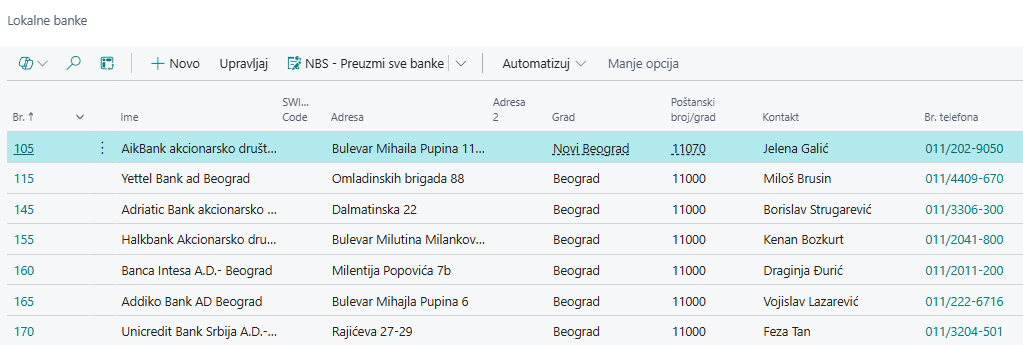
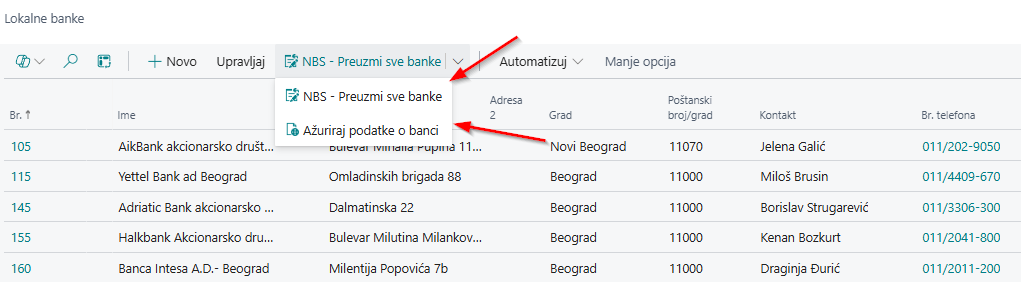
Nakon preuzimanja podataka o Lokalnim bankama, ako u pretragu Business Central-a unesite Lokalne banke dobicete listu preuzetih Lokalnih banaka. Lista lokalnih banaka može se ažurirati i ponovo preuzeti sa stranice Lokalne banke pokretanjem akcija NBS – Preuzmi sve banke i akcija Ažuriraj podatke o banci.
Akcija Valute
Akcija Valute omogućava preuzimanje svih valuta u Business Central. Kada sa stranice Podešavanje NBS preuzmete valute i dobijete kompletnu listu, istoj listi možete pristupiti i iz pretrage Business Central unošenjem termina Valute.
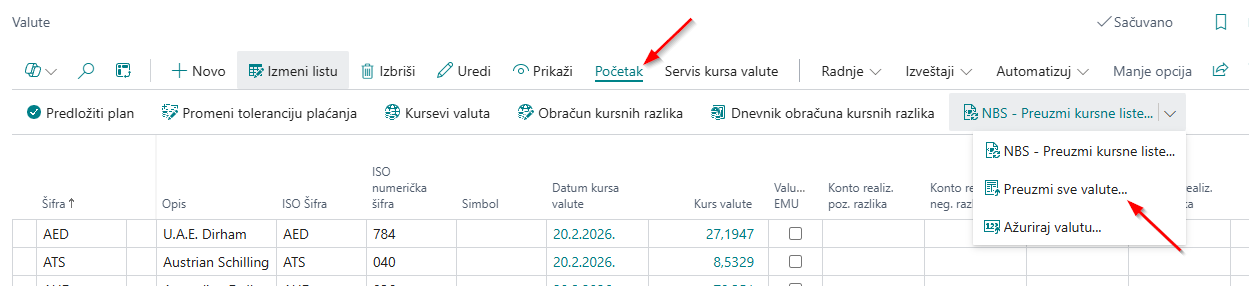
Valute se mogu preuzeti i direktno sa stranice Valute pomoću akcije Pocetak -> pa akcije Preuzmi sve valute . Ovu opciju koristite ukoliko prethodno niste preuzeli listu sa stranice Podešavanje NBS.
Preuzimanje šifarnika značajno smanjuje rizik od grešaka u radu sistema. Jedan od ključnih uslova za ispravno funkcionisanje jeste da šifre valuta budu unete u identičnom formatu kao na sajtu Narodne banke Srbije.
Na primer, ispravna šifra za evro je EUR. Ako se u polje šifre ručno unese EURO, sistem neće moći da preuzme odgovarajući kurs, jer takva oznaka ne postoji na sajtu NBS.
Akcija Preuzmi kursne liste sa NBS
Akcija Preuzmi kursne liste sa NBS, koja se nalazi na stranici Valute, omogućava sistemu da povuče sve kurseve sa sajta NBS za valute koje su na vašoj listi.
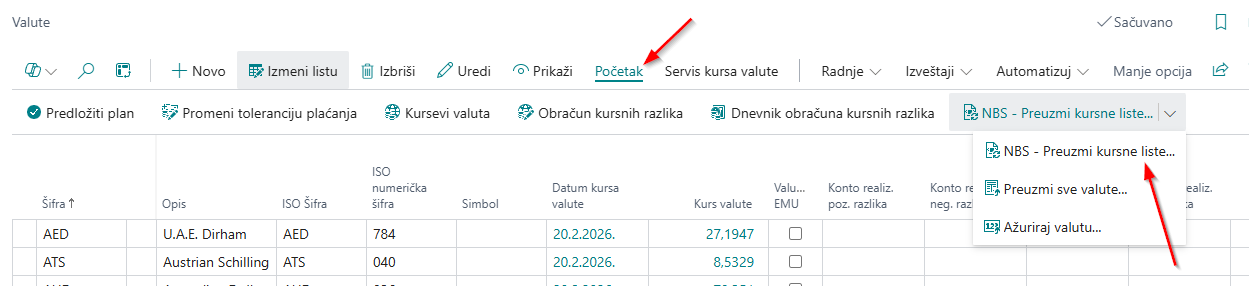
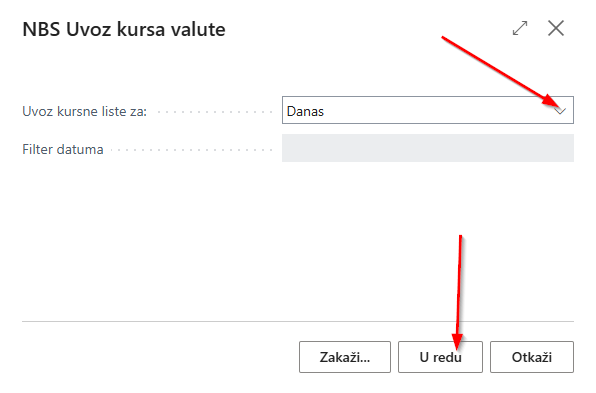
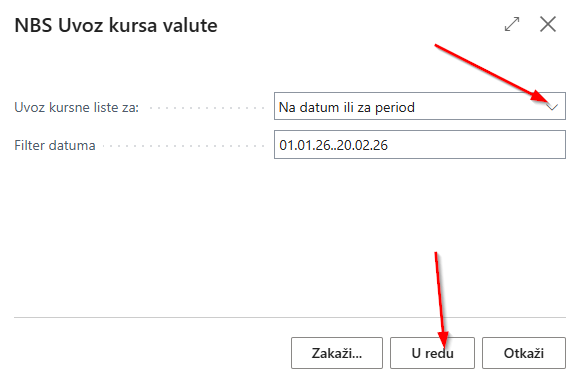
Po pokretanju akcije Preuzmi kursne liste sa NBS pojavljuje se novi prozor u kojem korisnik bira da li želi da preuzme kursne liste:
-
Na današnji dan
-
Na zadati datum ili za period
U polje Filter datuma unosimo željene datume za koje se vrši obrada. Nakon potvrde klikom na U redu, kursevi valuta će biti preuzeti i ažurirani u Business Central-u.
Kreiranje valute za preuzimanje efektivnog ili deviznog kursa NBS
Ukoliko imate dobavljača koji zahteva da se obračun vrši po efektivnom kursu određene lokalne banke, odnosno banke kod koje ima otvoren tekući račun, neophodno je kreirati kurs te lokalne banke.
Da biste pokrenuli funkciju i postavili parametre, otvorite stranicu Valute u Business Central (pristupa se putem pretrage Busienss Central-a). Zatim na stranici Valute kliknite na akciju Novo da biste kreirali novu karticu valute.
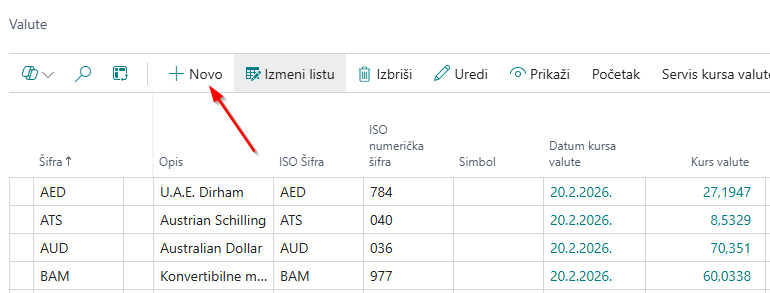
Podaci koji se popunjavaju na kartici Valute u tabu Opšte su:
-
Šifra : zavisno od valute (npr. EUR, USD), preporučuje se da naziv sadrži ime valute i inicijale banke.
-
Opis : kratak opis valute
-
ISO Šifra : upravo šifra koja je definisana po međunarodnim standardima (EUR. USD….)
-
ISO numerička šifra : definisana u šifarniku država i teritorija prema međunarodnim standardima.
-
Šifra originalne valute : npr. EUR, USD.
-
Konto : unosite konto pozitivne i negativne kursne ralika
-
Tip kursa : iz padajućeg menija izaberite da li želite vrednosti po prodajnom ili kupovnom kursu.
-
Šifra banke za kurs valute: prva tri broja predstavljaju fiksni identifikacioni broj banke, na osnovu kojeg sistem prepoznaje sa kojom bankom se vrši obrada
-
Vrsta kursne liste : biramo samo Efektivnu.
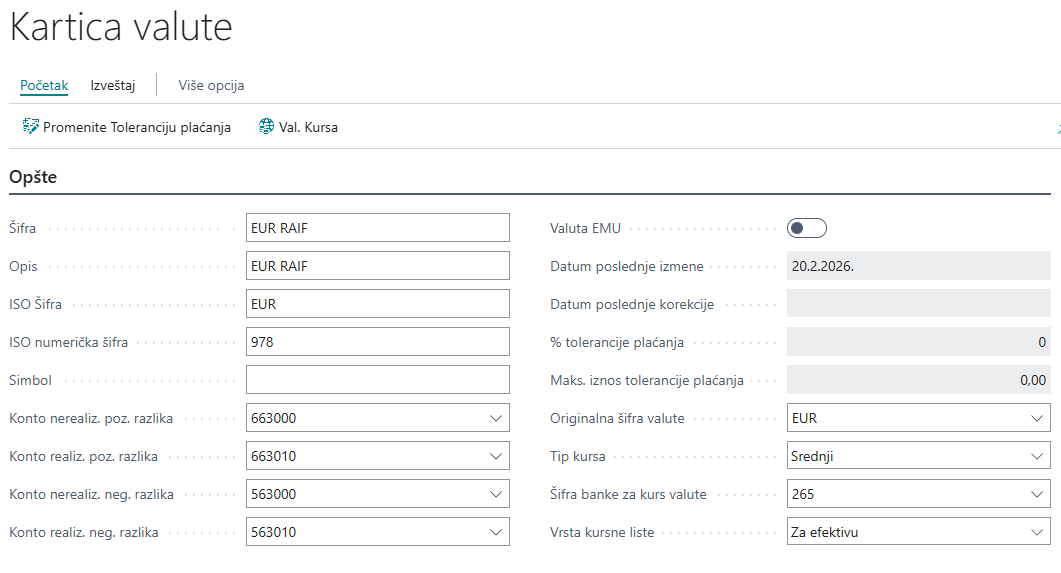
Napomena: Vrsta kursne liste – prodajni i kupovni kursevi komercijalnih banaka važe samo za efektivu i ne mogu se koristiti za devize. Kod kurseva NBS moguće je podesiti da sistem preuzima kupovne i prodajne kurseve i za devize i za efektivu, u skladu sa vašim potrebama.
Akcija Grupe Deltnosti
Akcija Grupe delatnosti nalazi se na stranici Podešavanje NBS → Radnje → Preuzmi podatke sa NBS → Grupe delatnosti. Nakon pokretanja ove akcije, dobićete preuzeti šifarnik Grupa delatnosti.
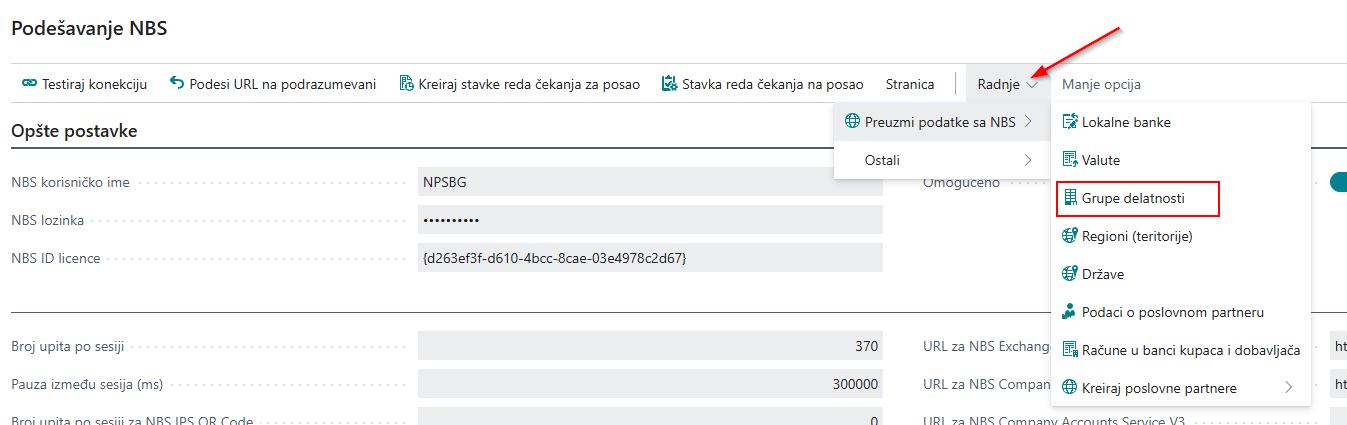
Grupe delatnosti predstavljaju klasifikaciju firmi prema vrsti poslovanja i označavaju tip njihove poslovne aktivnosti. Podaci o Grupi delatnosti se automatski prenose na poslovnog partnera prilikom preuzimanja podataka sa NBS.
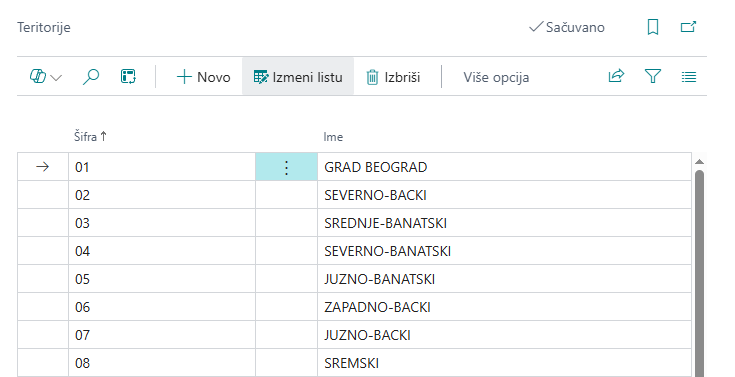
Akcija Regijoni (Teritorije)
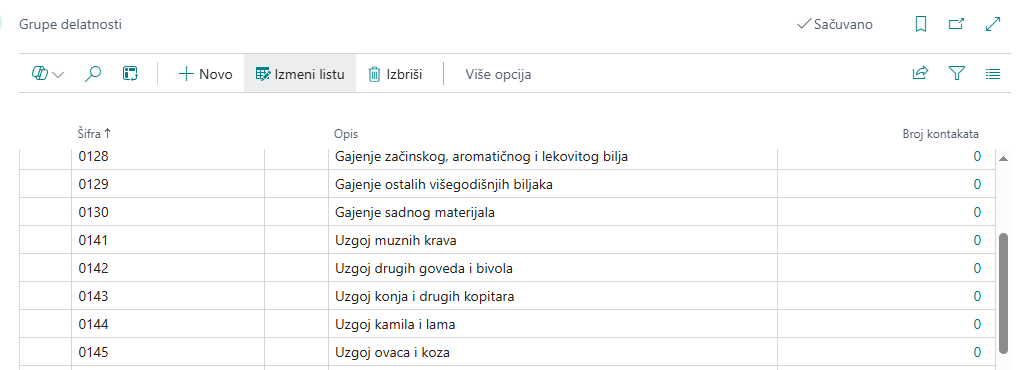
Akcija Regijoni (Teritorije) nalazi se na stranici Podešavanje NBS → akcija Radnje → akcija Preuzmi podatke sa NBS → akcija Regijoni (Teritorije). Nakon pokretanja ove akcije, dobićete preuzeti šifarnik Regijoni (Teritorije).
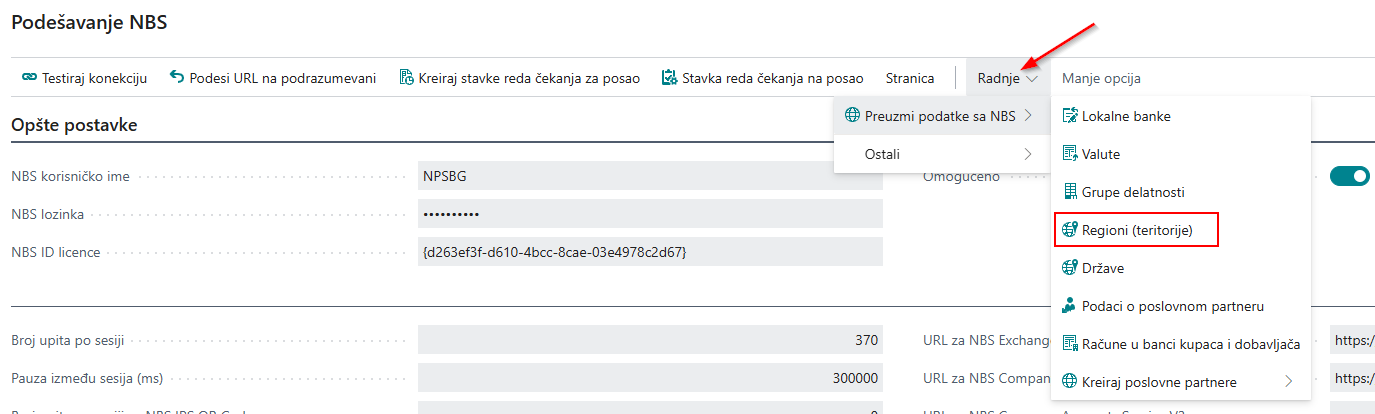
Regioni (Teritorije) u Business Central-u predstavljaju geografske oblasti koje služe za kategorizaciju poslovnih partnera. Podaci o Regijonu (Teritoriji) se automatski prenose na poslovnog partnera prilikom preuzimanja podataka sa NBS.
Akcija Države
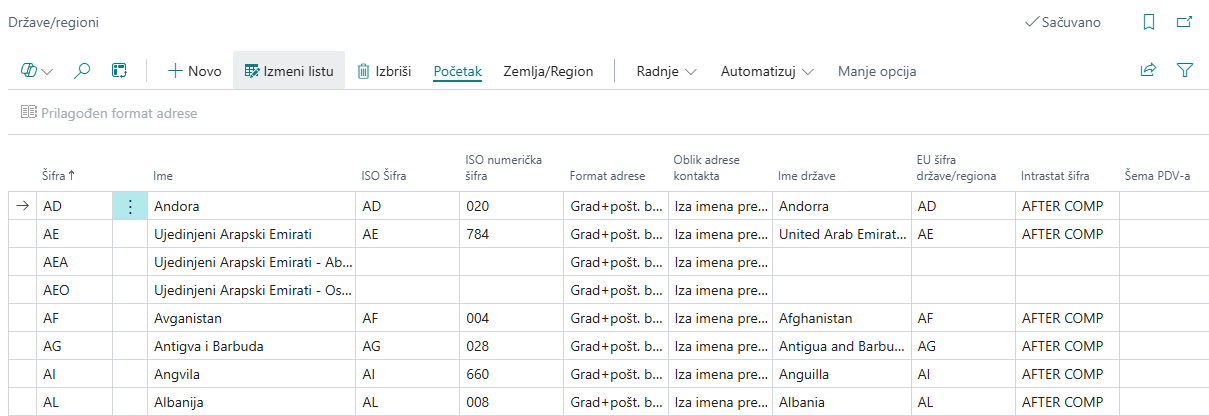
Akcija Države nalazi se na stranici Podešavanje NBS → akcija Radnje → akcija Preuzmi podatke sa NBS → akcija Države . Nakon pokretanja ove akcije, dobićete preuzeti šifarnik Države.
Države u Business Central‑u je stranica koja sadrži šifarnik država zasnovan na ISO standardima. Svaka država ima svoju ISO šifru koja omogućava standardizovano kodiranje poslovnih partnera, kupoprodajnih transakcija. Korišćenjem ISO šifara obezbeđuje se doslednost podataka u sistemu, lakša integracija sa drugim aplikacijama.
Akcija Podaci o poslovnom partneru
Da bi se izbegle greške pri unosu podataka o poslovnim partnerima (kupcima i dobavljačima), dostupna je funkcija koja omogućava preuzimanje podataka sa servera NBS. Za korišćenje ove funkcije, obavezno je da na kartici kontakta bude unet matični broj ili PIB. Na ovaj način se automatski dobijaju tačni podaci – ime, adresa, poštanski broj, grad, matični broj i PIB – što štedi vreme pri unosu i olakšava proveru podataka.
-
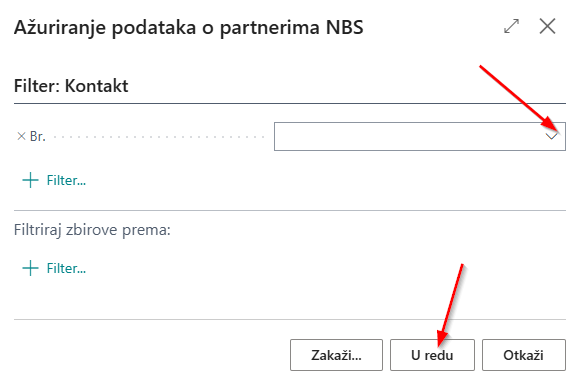
Akcija Podaci o poslovnom partneru nalazi se na stranici Podešavanje NBS → akcija Radnje → akcija Preuzmi podatke sa NBS → akcija Podaci o poslovnom partneru. Nakon pokretanja ove akcije, otvara se prozor za unos podataka:
-
Filter Kontakt – u ovom polju bira se broj kontakta iz padajuće liste, ukoliko želite da preuzmete podatke samo za jedan kontakt. Klikom na U redu, podaci će biti preuzeti sa NBS.
-
Ako je Filter Kontakt prazan, sistem će preuzeti podatke za sve kontakte koji imaju unet PIB ili matični broj. Klikom na U redu, podaci će biti preuzeti sa NBS.
-
- Akcija Podaci o poslovnom partneru nalazi se na kartici Kontakta, kao i na karticama Kupca i Dobavljača. Ova funkcija omogućava preuzimanje podataka sa NBS za pojedinačni kontakt, kupca ili dobavljača. Na taj način je obezbeđeno da se, prilikom unosa novog kontakta ili poslovnog partnera, podaci automatski preuzmu i popune direktno sa NBS, čime se smanjuje mogućnost greške i ubrzava proces unosa.
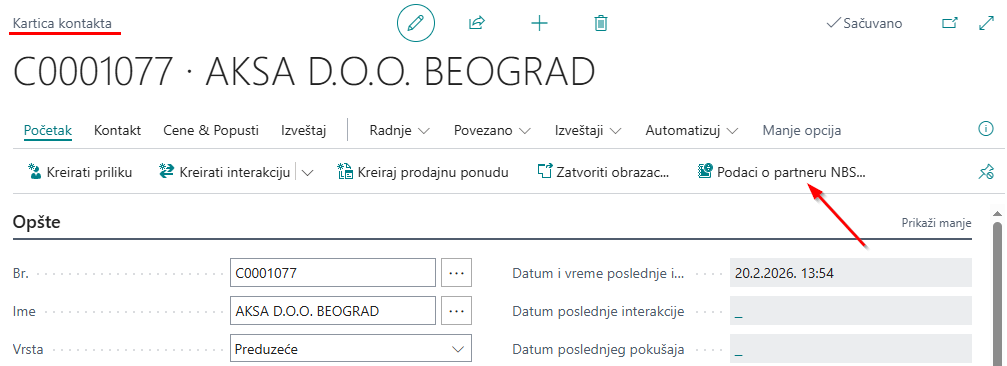
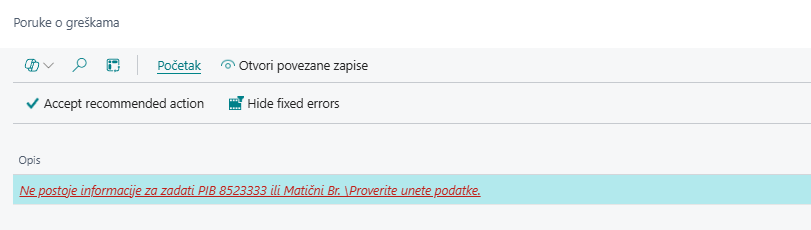
Napomena: Ukoliko na kartici kontakta, kartici kupca i dobavljača nije unet nijedan od ova dva podatka (matični broj i PIB), Business Central će prikazati poruku o grešci i preuzimanje neće biti moguće.
Akcija Kreiraj kontakt iz NBS na stranicici Kontakti
Stranici Kontakti pristupate unosom u pretragu Kontakti u Business Central. Na toj stranici možete pregledati postojeće kontakte ili kreirati novi.
Na stranici Kontakti izaberite akciju Početak → akcija NBS Podaci o partneru → akcij Kreiraj kontakt iz NBS.
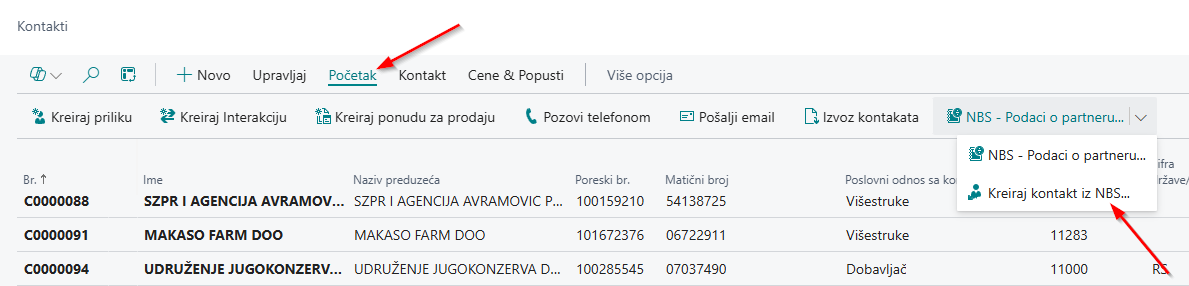
Pokretanjem akcije Kreiraj kontakt iz NBS otvara se nova stranica za unos PIB-a ili matičnog broja.

Nakon unosa PIB-a ili Matičnog broja, u Business Central-u se kreira novi kontakt sa podacima preuzetim sa servisa NBS, a korisniku se automatski otvara kartica kontakta kako bi, po potrebi, uneo dodatne informacije.
Klikom na U redu, podaci o partneru se ažuriraju, dok izborom Otkaži podaci neće biti sačuvani.
Akcija Račune u banci kupca i dobavaljača
Preuzimanje i ažuriranje tekućih računa moguće je na dva načina:
- Sa stranice Podešavanje NBS, pokretanjem akcije Radnje → akcije Preuzmi podatke sa NBS → akcije Račune u banci kupca i dobavljača, otvara se prozor za unos dodatnih parametara. Ovde možete izabrati da li ćete preuzimati podatke samo za kupce, samo za dobavljače ili za oba, označavanjem odgovarajuće opcije na stranici. Za filtere knjižna grupa kupaca i knjižna grupa dobavljača, koji se takođe biraju na stranici, preporuka je da se obrada pokreće samo za domaće partnere, jer ino kupci i dobavljači nisu registrovana pravna lica na sajtu NBS.
Po izboru odgovarajućih parametara, klikom na dugme U redu, sistem će preuzeti ili ažurirati tekuće račune kupaca i dobavljača.
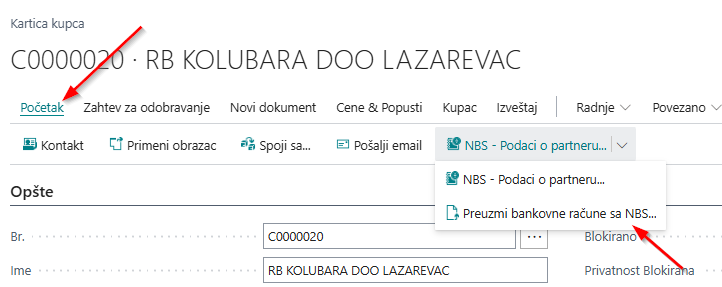
- Sa kartice Kupca ili kartice Dobavljača, pokretanjem akcije Početak → Preuzmi podatke sa NBS → Preuzmi bankovne račune sa NBS. Sistem preuzima tekuće račune isključivo za kupca ili dobavljača sa čije se kartice pokreće akcija Preuzmi bankovne račune sa NBS.
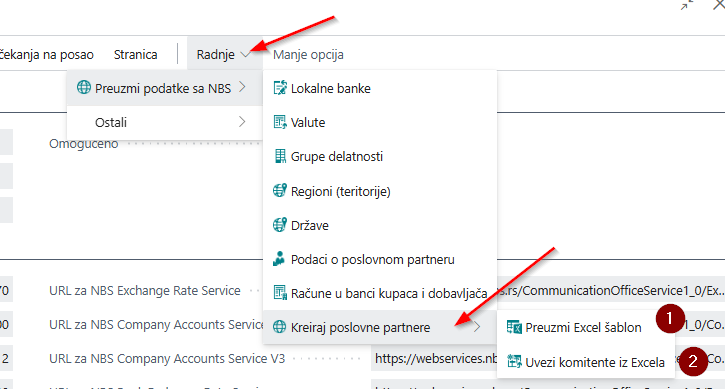
Akcija Kreiranje poslovnih partnera
Akcija Kreiranje poslovnih partnera omogućava pokretanje dve međusobno povezane akcije koje olakšavaju brzo unošenje podataka:
-
Preuzmi Excel šablon
-
Uvezi kontakte iz Excela
1. Preuzmi Excel šablon– Excel sadrži sve važne podatke potrebne za kreiranje kartice kontakta (kupca i dobavljača).
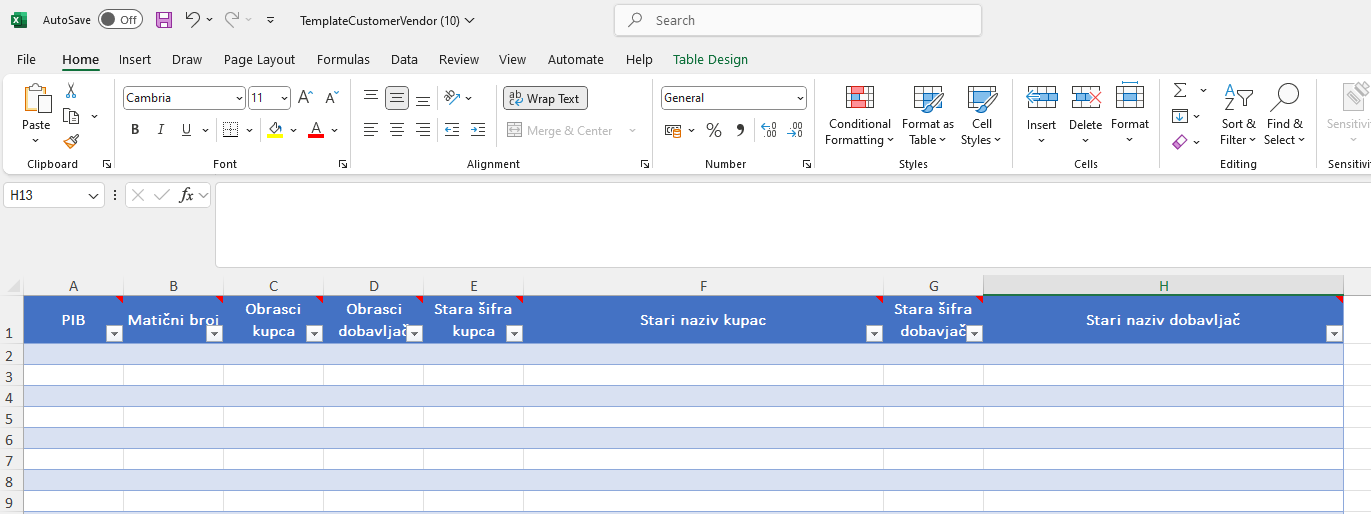
Sledeća polja treba popuniti:
-
PIB
-
Matični broj
-
Šabloni za kupca
-
Šabloni za dobavljača
-
Stari broj kupca – ako prenosite podatke iz prethodnog softvera
-
Stari naziv kupca – ako prenosite podatke iz prethodnog softvera
-
Stari broj dobavljača – ako prenosite podatke iz prethodnog softvera
-
Stari naziv dobavljača – ako prenosite podatke iz prethodnog softvera
Obavezna polja koja moraju biti popunjena u preuzetom Excelu šablonu su PIB ili Matični broj, kao i Šabloni za kupca i Šabloni za dobavljača. Ako ova polja nisu popunjena, kontakt, kupac i dobavljač neće biti kreirani.
Ostala polja iz preuzetog Excela šablona popunjavaju se po potrebi, ukoliko vam ti podaci trebaju.
2. Uvezi kontakte iz Excela - Pokretanjem ove akcije, podaci će biti uvezeni iz Excel šablona.
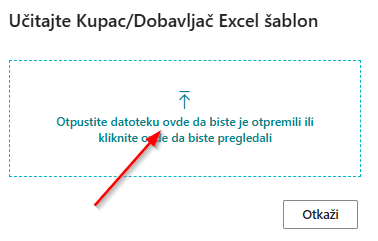
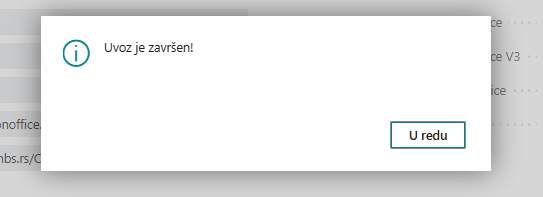
Na stranici zahteva, opcija Odaberi omogućava izbor Excel dokumenta koji želite da uvezete. Ako neki PIB ili matični broj nije ispravan, sistem će prikazati poruku o grešci.
Akcija Kreiraj stavke reda čekanja za posao
Nakon unosa navedenih parametara, funkcionalnosti su spremne za korišćenje.
U zaglavlju stranice Podešavanja NBS, pokretanjem opcije Kreiraj stavke čekanja za posao, sistem automatski kreira obradu koja će svakog dana, uključujući i vikend, preuzimati kurs sa NBS.
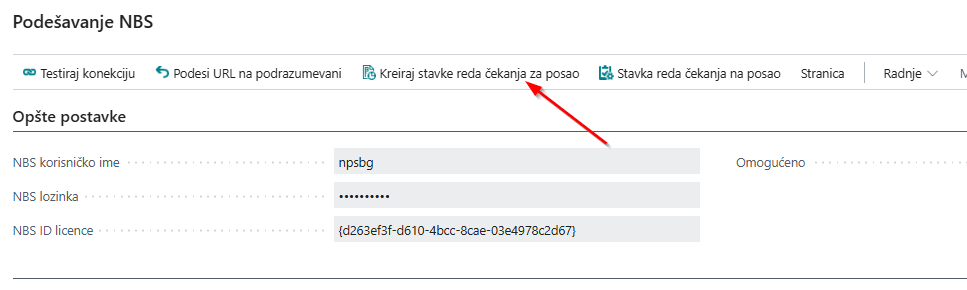
Na taj način kurs će se ažurirati svakodnevno. Ukoliko je neki kupac ili dobavljač blokiran zbog prinudne naplate, u Business Central-u će dobiti status Blokiran (status je vidljiv na kartici kupca/dobavljača). Ova funkcionalnost omogućava praćenje statusa kupaca i dobavljača u NBS i doprinosi smanjenju vašeg poslovnog rizika.
Stavka reda čekanja za posao
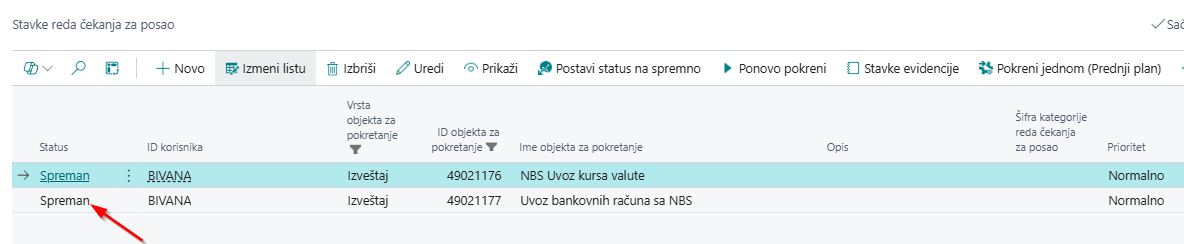
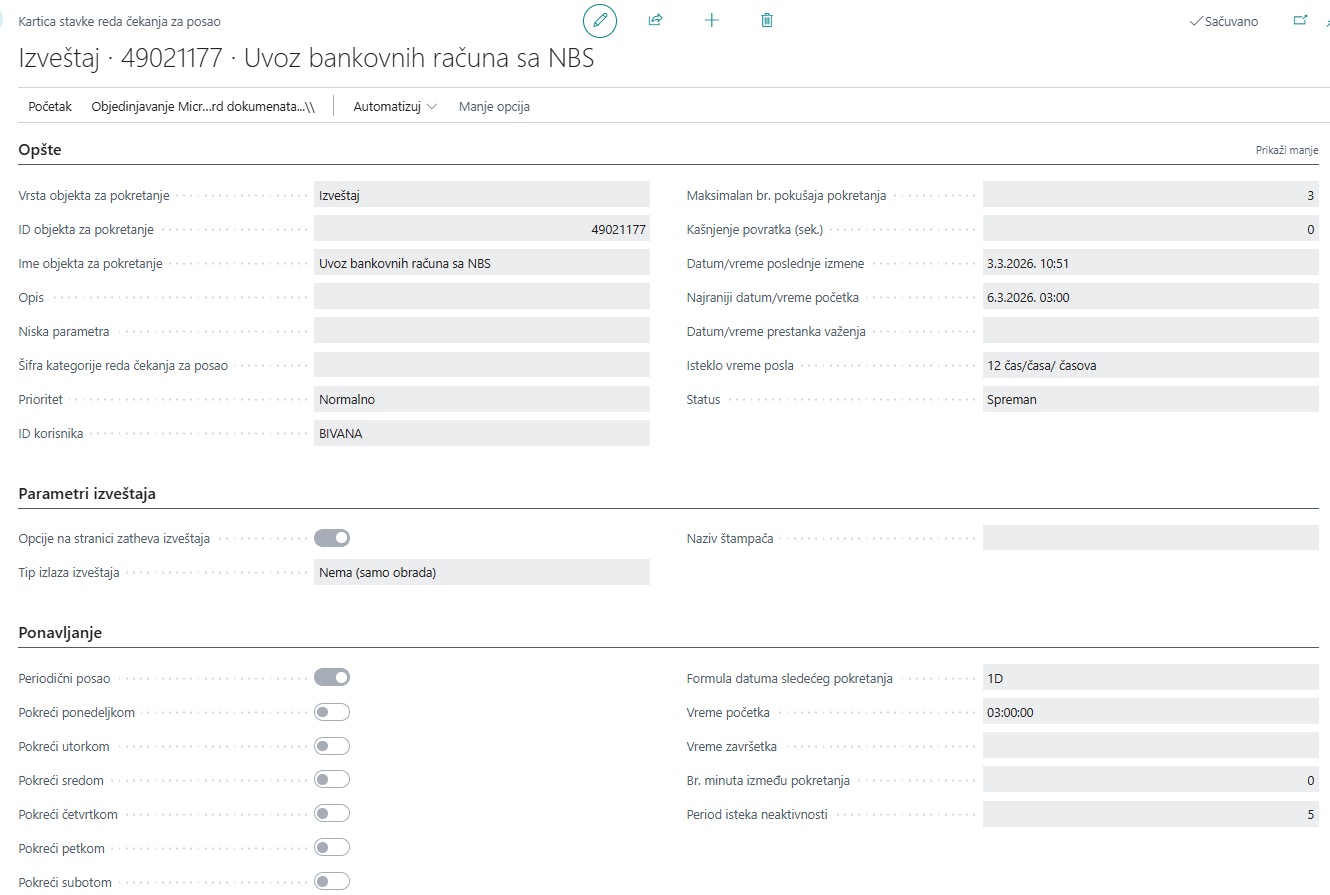
Nakon što kreirate Stavke reda čekanja za posao, iste možete videti klikom na akciju Stavke reda čekanja za posao, otvorice se stranica sa krerianim redom stavke čeknaja, klikom stavku otvara se kartica Stavka reda čekanja za posao. Na samoj kartici moguće je podesiti period, odnosno dane ažuriranja.
Potrebna vam je pomoć?