How to create Prod. Order Report
This report offers valuable insights into the production quantity, the associated material consumption and the level of capacity utilization specific to that quantity. The rows of the report show the quantities produced, the amount of material consumed for that quantity and the capacity utilized for that quantity.
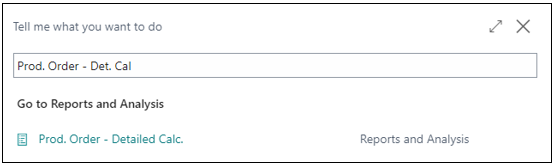
In the search bar, enter Prod. Order - Detailed Calc.
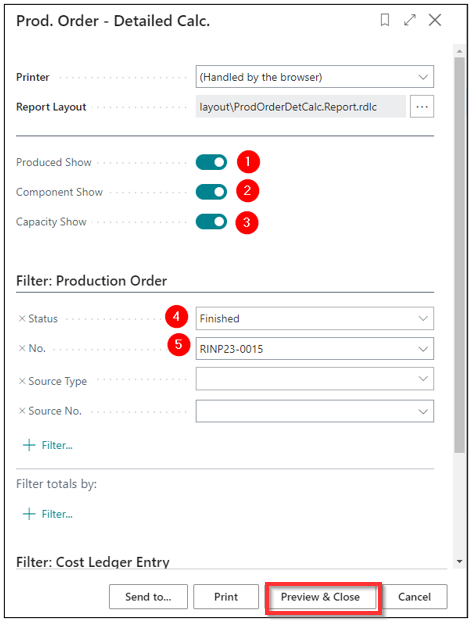
Report Options
-
Produced Show - If it's checked, it indicates that the item details will be shown.
-
Component Show - If the checkbox is checked, it indicates that material costs will be shown on the report.
-
Capacity Show - If the checkbox is checked, it indicates that capacity costs will be shown on the report.
-
Status - On the list, you can choose the order status for which you wish to review the details.
-
No. - Select Production Order
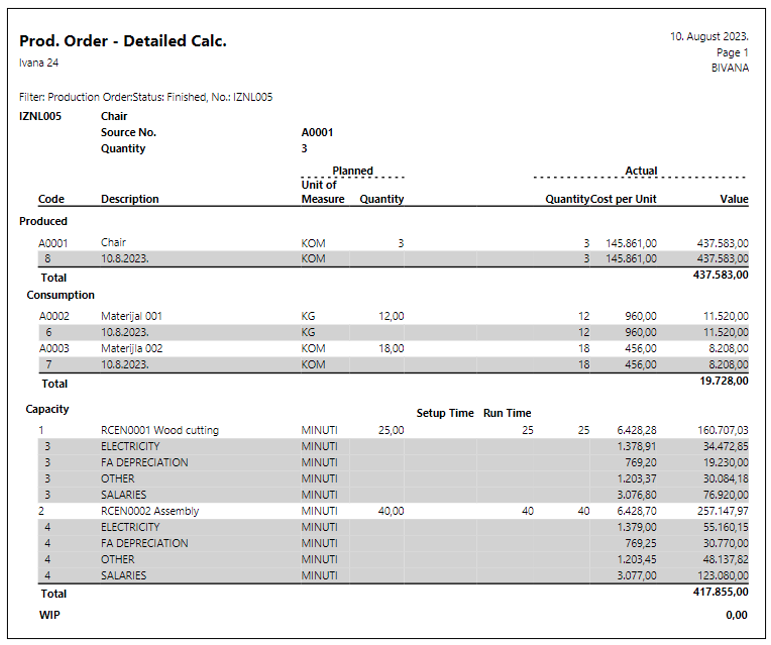
Report Information
This report shows us:
- The produced quantity per unit of measure.
- The amount of material consumed for the produced quantity per unit of measure (for example, for a package, one material is in kg, and the other material is in pcs).
- The amount of capacity consumed for the produced quantity per unit of measure (for example, for a package, it's in minutes).
- The costs included in production and their proportion (allocated based on the specified percentage in the capacity cost distribution table).
- The total cost value per work centers.
- The total value of the produced product.
NPS D.O.O. | +381 11 260 9850 | info@nps.rs | www.nps.rs
Need more help?